I had forgotten to add SQL Injection prevention logic when I integrated and implemented a SQL search function for my employer’s internal ASP.NET app. So in this post, I’m adding it for archival and sharing purposes.
SQL injection is an attack in which malicious code is inserted into strings that are later passed to an instance of SQL Server for parsing and execution.
BTW, here’s an excellent article about SQL Injection on the MSDN site.
1. The first thing you’ll need to do is grab the user’s input from the search textbox; for example:
<font size="2"><span style="color: rgb(0,128,0)">// Get user search input
</span><span style="color: rgb(0,0,255)">string</span> requestString = txtSearch.Text.Trim(<span style="color: rgb(0,0,255)">null</span>);</font>
2. Next, you’ll need to add logic to see if the user input contains any of the following:
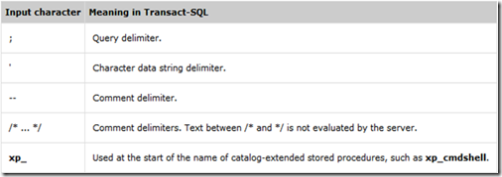
I added something like this:
<p><font size="2"><span style="color: rgb(0,0,255)">if</span> ((requestString.Contains(<span style="color: rgb(163,21,21)">";"</span>)) || (requestString.Contains(<span style="color: rgb(163,21,21)">"'"</span>)) ||
    (requestString.Contains(<span style="color: rgb(163,21,21)">"--"</span>)) || (requestString.Contains(<span style="color: rgb(163,21,21)">"/*"</span>)) ||
    (requestString.Contains(<span style="color: rgb(163,21,21)">"*/"</span>)) || (requestString.Contains(<span style="color: rgb(163,21,21)">"xp_"</span>)))
</span>{
    </font><font size="2"><span style="color: rgb(0,128,0)">// Stop processing and notify user
</span>}
</font><font size="2"><span style="color: rgb(0,0,255)">else
</span>{
    </font><font size="2"><span style="color: rgb(0,128,0)">// Continue processing and show results
</span>}</font></p>
3. Build/compile your app then test it out. If all goes well, you should not get any errors and your web app’s search function should now be SQL Injection-proof.