Archive for the ‘ASP.NET’ Category

29
Jul

Adding for archival purposes…

using System;
using System.Collections.Generic;
using System.Linq;
using System.Web;
using System.Security.Cryptography;

namespace Classes
{
    public class Hash
    {
        public Hash()
        { }

        #region Hash Choices
        /// <summary>The wanted hash function.</summary>
        public enum HashType : int
        {
            /// <summary>MD5 Hashing</summary>
            MD5,
            /// <summary>SHA1 Hashing</summary>
            SHA1,
            /// <summary>SHA256 Hashing</summary>
            SHA256,
            /// <summary>SHA384 Hashing</summary>
            SHA384,
            /// <summary>SHA512 Hashing</summary>
            SHA512
        } /* HashType */
        #endregion

        #region Public Methods
        /// <summary>Generates the hash of a text.</summary>
        /// <param name="strPlain">The text of which to generate a hash of.</param>
        /// <param name="hshType">The hash function to use.</param>
        /// <returns>The hash as a hexadecimal string.</returns>
        public static string GetHash(string strPlain, HashType hshType)
        {
            string strRet;
            switch (hshType)
            {
                case HashType.MD5:
                    strRet = GetMD5(strPlain);
                    break;
                case HashType.SHA1:
                    strRet = GetSHA1(strPlain);
                    break;
                case HashType.SHA256:
                    strRet = GetSHA256(strPlain);
                    break;
                case HashType.SHA384:
                    strRet = GetSHA384(strPlain);
                    break;
                case HashType.SHA512:
                    strRet = GetSHA512(strPlain);
                    break;
                default:
                    strRet = "Invalid HashType";
                    break;
            }
            return strRet;
        } /* GetHash */

        /// <summary>Checks a text with a hash.</summary>
        /// <param name="strOriginal">The text to compare the hash against.</param>
        /// <param name="strHash">The hash to compare against.</param>
        /// <param name="hshType">The type of hash.</param>
        /// <returns>True if the hash validates, false otherwise.</returns>
        public static bool CheckHash(string strOriginal, string strHash, HashType hshType)
        {
            string strOrigHash = GetHash(strOriginal, hshType);
            return (strOrigHash == strHash);
        } /* CheckHash */
        #endregion

        #region Hashers
        private static string GetMD5(string strPlain)
        {
            UnicodeEncoding UE = new UnicodeEncoding();
            byte[] HashValue, MessageBytes = UE.GetBytes(strPlain);
            MD5 md5 = new MD5CryptoServiceProvider();
            string strHex = "";

            HashValue = md5.ComputeHash(MessageBytes);
            foreach (byte b in HashValue)
            {
                strHex += String.Format("{0:x2}", b);
            }
            return strHex;
        } /* GetMD5 */

        private static string GetSHA1(string strPlain)
        {
            UnicodeEncoding UE = new UnicodeEncoding();
            byte[] HashValue, MessageBytes = UE.GetBytes(strPlain);
            SHA1Managed SHhash = new SHA1Managed();
            string strHex = "";

            HashValue = SHhash.ComputeHash(MessageBytes);
            foreach (byte b in HashValue)
            {
                strHex += String.Format("{0:x2}", b);
            }
            return strHex;
        } /* GetSHA1 */

        private static string GetSHA256(string strPlain)
        {
            UnicodeEncoding UE = new UnicodeEncoding();
            byte[] HashValue, MessageBytes = UE.GetBytes(strPlain);
            SHA256Managed SHhash = new SHA256Managed();
            string strHex = "";

            HashValue = SHhash.ComputeHash(MessageBytes);
            foreach (byte b in HashValue)
            {
                strHex += String.Format("{0:x2}", b);
            }
            return strHex;
        } /* GetSHA256 */

        private static string GetSHA384(string strPlain)
        {
            UnicodeEncoding UE = new UnicodeEncoding();
            byte[] HashValue, MessageBytes = UE.GetBytes(strPlain);
            SHA384Managed SHhash = new SHA384Managed();
            string strHex = "";

            HashValue = SHhash.ComputeHash(MessageBytes);
            foreach (byte b in HashValue)
            {
                strHex += String.Format("{0:x2}", b);
            }
            return strHex;
        } /* GetSHA384 */

        private static string GetSHA512(string strPlain)
        {
            UnicodeEncoding UE = new UnicodeEncoding();
            byte[] HashValue, MessageBytes = UE.GetBytes(strPlain);
            SHA512Managed SHhash = new SHA512Managed();
            string strHex = "";

            HashValue = SHhash.ComputeHash(MessageBytes);
            foreach (byte b in HashValue)
            {
                strHex += String.Format("{0:x2}", b);
            }
            return strHex;
        } /* GetSHA512 */
        #endregion
    }
}

12
Jul

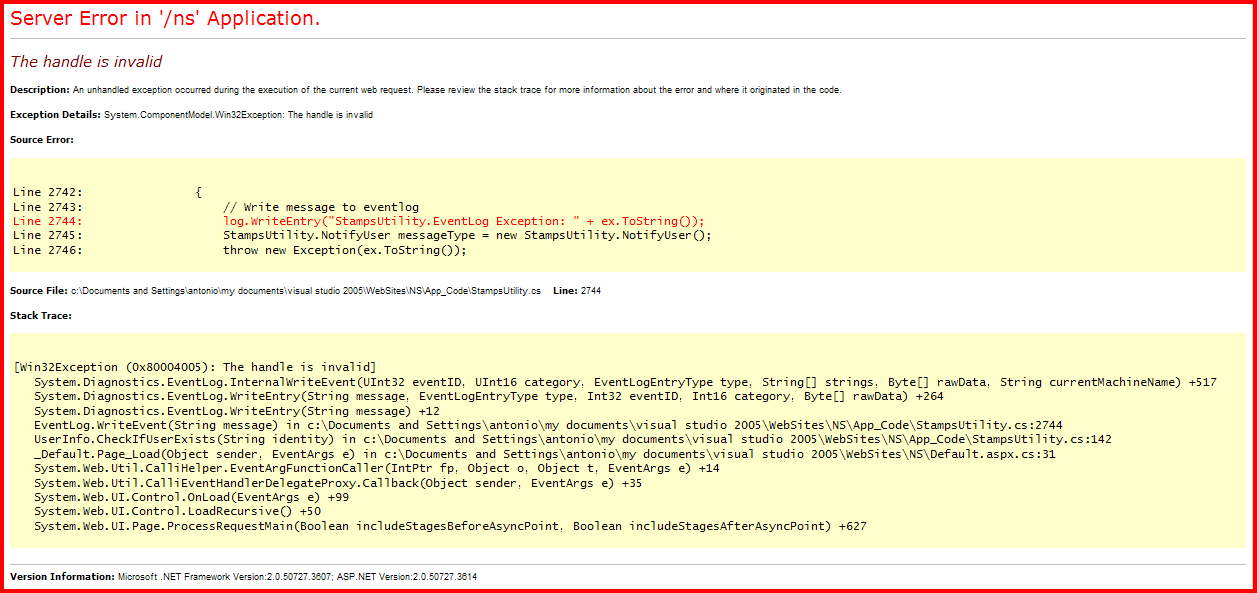
Have you ever come across the error below with one of your ASP.NET web apps that is trying to write to the Eventlogs? If so, read on…

image

By default the ASPNET user cannot access the existing eventlogs categories. To resolve this, you must set the permissions in the Eventlog key in the registry:

  1. Launch RegEdit.
  2. Navigate to HKEY_LOCAL_MACHINE\SYSTEM\CurrentControlSet\Services\EventLog\.
  3. From the menu, select Edit->Permissions.
  4. Click the Add button and write ASPNET (if ASP.NET is running under a different User ID, use that ID instead).
  5. Click OK.
  6. Select the newly added user from the list (ASP.NET Machine User by default).
  7. Click on Full Control in the Allow column. 8. Click OK.

More info here.

24
May

Below is a summary of the “two top things that cause trouble in production ASP.NET web sites,” per Scott Hanselman, which he obtained from deep within Microsoft Developer Support.  Go here to read the complete article.

#1 Issue – Configuration

Seems the #1 issue in support for problems with ASP.NET 2.x and 3.x is configuration. 

Symptoms Notes
OOM
Performance
High memory
Hangs
Deadlocks
There are more debug=true cases than there should be.


#2 Issue – Problems with an External (non-ASP.NET) Root Cause

Sometimes when you’re having trouble with an ASP.NET site, the problem turns out to not be ASP.NET itself.

Issue Product Description Symptoms Notes
Anti-virus software All Anti-virus software is installed onto Servers and causes all kinds of problems.
  • Application restarting
  • Slow performance
  • Session variable are null
  • Cannot install hotfix
  • Intermittent time outs
  • High memory
  • Session lost
  • IDE Hangs
  • Deadlocks

This consists of all AV software reported by our customers. All cases do not report the AV software that is being used so the manufacturer is not always known.

KB821438, KB248013, KB295375, KB817442

3rd party Vendors All This is a category of cases where the failure was due to a 3rd party manufacturer.
  • Crash
  • 100% CPU
  • High memory
  • Framework errors
  • Hang
The top culprits are 3rd party database systems, and 3rd party internet access management systems
Microsoft component All Microsoft software
  • Intermittent time outs
  • High memory
  • Deadlocks
  • 100% CPU
    Crash
Design issues that cause performance issues like sprocs, deadlocks, etc. Profile your applications and the database! (Pro tip: select * from authors doesn’t scale.) Pair up DBAs and programmers and profile from end to end

27
Dec

Just sign up with your Windows Live/Passport account and you can download all three e-books by Microsoft Press.  It includes the following:

image

Enjoy!

27
Jun

On one of my ASP.NET 2.0 projects, I had to use an XML file as the data source for a GridView control. The problem was that I had never used this method before. But after doing some research, I found it to be very similar (and straightforward) to binding to a database – with the exception of the need to use XPath.

So…without further adieu, here are the steps and code. Enjoy!

1. Create an XML file that contains your data, like below (taken from Microsoft’s website to save a lot of typing). Save it as books.xml.

<?xml version="1.0"?>
<catalog>
  <book id="bk101">
    <author>Gambardella, Matthew</author>
    <title>XML Developer's Guide</title>
    <genre>Computer</genre>
    <price>44.95</price>
    <publish_date>2000-10-01</publish_date>
    <description>
      An in-depth look at creating applications
      with XML.
    </description>
  </book>
  <book id="bk102">
    <author>Ralls, Kim</author>
    <title>Midnight Rain</title>
    <genre>Fantasy</genre>
    <price>5.95</price>
    <publish_date>2000-12-16</publish_date>
    <description>
      A former architect battles corporate zombies,
      an evil sorceress, and her own childhood to become queen
      of the world.
    </description>
  </book>
</catalog>

2. Add a GridView control to your .aspx page and rename it to gdvBooks.
3. Drag an XmlDataSource control to your form, rename it xdsBooks, and assign your XML file (books.xml) in the control’s DataFile property.
4. Next, change to Source view and input the code below.

<asp:GridView ID="gdvServerVersions" runat="server"         
    AutoGenerateColumns="False" DataKeyNames="id"         
    DataSourceID="xdsServerVersions" EmptyDataText="No data available.">                
    <Columns>
        <asp:BoundField HeaderText="Book ID" DataField="id" 
            SortExpression="id" />
        <asp:TemplateField HeaderText="Author">
            <ItemTemplate>
                <%# XPath("author") %>
            </ItemTemplate>
        </asp:TemplateField>
        <asp:TemplateField HeaderText="Title">
            <ItemTemplate>
                <%# XPath("title") %>
            </ItemTemplate>
        </asp:TemplateField>
        <asp:TemplateField HeaderText="Genre">
            <ItemTemplate>
                <%# XPath("genre") %>
            </ItemTemplate>
        </asp:TemplateField>
        <asp:TemplateField HeaderText="Price">
            <ItemTemplate>
                <%# XPath("price") %>
            </ItemTemplate>
        </asp:TemplateField>
        <asp:TemplateField HeaderText="Publish Date">
            <ItemTemplate>
                <%# XPath("publish_date") %>
            </ItemTemplate>
        </asp:TemplateField>
        <asp:TemplateField HeaderText="Description">
            <ItemTemplate>
                <%# XPath("description")%>
            </ItemTemplate>
        </asp:TemplateField>
    </Columns>
</asp:GridView> 

5. That’s it! Simply navigate to your newly created page and see the results.


  • Search:
  • Archives