If you’re a Mac convert using Parallels to run Windows, you’re probably wondering where the Print Screen (used for screen captures in Windows) OS X is. Well, unfortunately, there’s no exact keyboard stroke for it; however equivalent; however, you can either use a third-party app like SnagIT, or go the smarter route by using the Windows built-in On-Screen Keyboard tool.
To access it:
1. Go to Start > Run.
2. Type osk then hit Enter.
If all went well, you should see something like this:
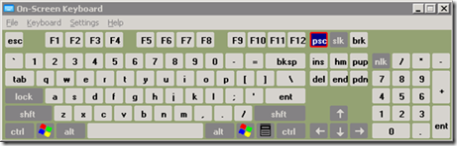
Voila! You can click the psc key to copy any image (e.g., your desktop) into the [Windows] clipboard, which you can then paste into MS Paint to manipulate to your liking.
Hope this tip helps.
Comments
3 responses to “Print Screen in Mac OS X under Parallels”
Many thanks for that, I’ve been wanting to do this for a while.
Thanks for the tips, very helpful. but it can only capture the first screen instead of the full page. If you want to capture the full web-page including the scroll-down part, I’d recommend acethinker screen grabber, free and works pretty well for me.
Thanks for the tip, Owen!